
Encoding frames
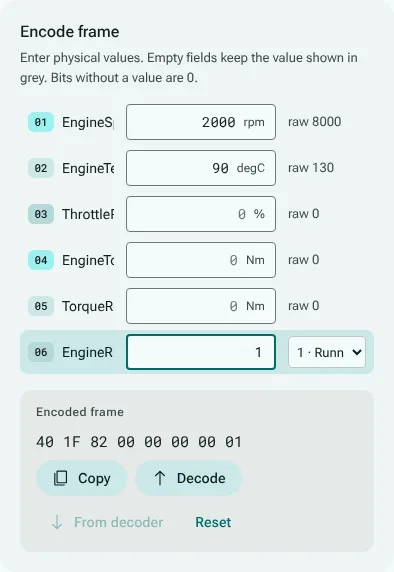
The frame encoder is the inverse of the decoder: you enter a physical value for each signal of a message, and it gives the frame's bytes in hex. It is the Encode frame card on every message page.
Entering values
- One field per signal, in the signal's unit. A field you leave empty keeps the value shown in grey, which is what the frame holds for that signal now.
- For a signal with value descriptions, a list lets you pick a description instead of typing its value.
- Encoded frame shows the bytes as you type. Copy copies them.
- Bits without a value are 0. From decoder starts from the frame in the decoder instead, so that you can change one signal of a frame you have; Reset starts over.
- Decode shows the encoded frame in the decoder, signal by signal.
In a multiplexed message, a multiplexed signal counts only when the multiplexor values you entered select it; the others are marked mux inactive.
When a value does not fit
The encoder never changes a value behind your back. The frame is decoded again after every change, and each field says when the frame does not hold what you typed:
- Not a number, when the field cannot be read;
- Out of range, with the range the signal's bits can hold: the value is not encoded, not clamped;
- Outside the n-byte data area, for a signal that runs past the end of the frame;
- Overwritten by an overlapping signal, when another signal shares its bits;
- encodes as …, when the signal's resolution rounds the value, with the value the frame holds;
- a warning, Outside the database range, when the value fits the bits but lies outside the minimum and maximum the database gives.
When a signal is overwritten, the card also says, above the frame, that the frame does not hold every value as entered: there a value was encoded and then changed by another signal, so the frame contradicts a field that looks accepted. In the other cases the field's own note is the whole story: the value was not encoded at all, or the note gives the value the frame holds.
How it is checked
For every one of the 58 real-world DBC files CanViewer is tested against, every signal, and sampled whole frames, are encoded and decoded again, and must come back as entered.